Developer tools
Omarchy Project Manager
A keyboard-driven project launcher with fuzzy search, Git status, editor actions, and automatic task discovery.
Overview
Getting back to work faster
Opening a project usually means more than finding its folder. I also need an editor, a terminal, the current Git state, and the right task for that particular codebase.
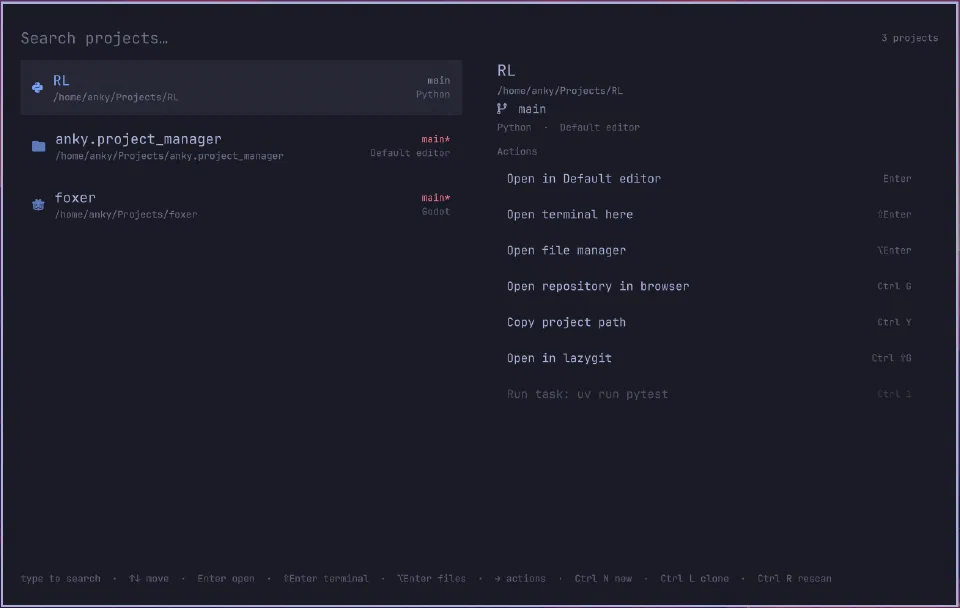
Omarchy Project Manager puts those actions in a keyboard-driven desktop overlay. Fuzzy search helps find a project, and frequently or recently used projects move closer to hand.
It is a tool built around my own Linux workflow: reducing the small interruptions involved in switching between different kinds of software projects.
Technical detail
Discovery and context
A Bash helper discovers Git repositories and Godot projects under configured roots. Project files identify available tools and tasks, while Git metadata supplies branch, working-tree changes, and ahead/behind information.
An interface for project actions
QML provides the overlay and JavaScript manages the project store. Actions cover editor selection, terminals, file-manager access, repository links, lazygit, and detected build tasks.
Usage ranking combines recency and frequency. Configuration and usage state are kept separate, allowing the launcher to remember working habits without mixing them into project definitions.